Multiple form themes in Mailchimp for WordPress Pro
Published by Danny van Kooten on .
A long-requested feature has just made its way into Mailchimp for WordPress Pro: the ability to create multiple form themes using the Styles Builder. This makes it much easier to give individual sign-up forms their own design without writing custom CSS.
Styling individual sign-up forms
Until now, using the Styles Builder generated a stylesheet that affected all of your sign-up forms. That made it harder to target individual forms. The only option was to add custom CSS rules to the Manual CSS section.
After updating the Mailchimp for WordPress plugin to version 2.4, the Styles Builder will ask which form you want to design styles for.
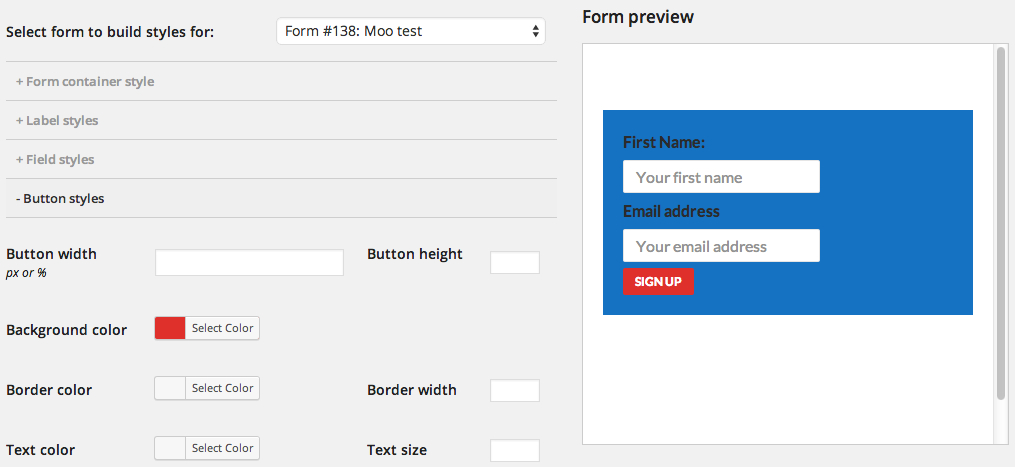
Selecting a form will load any previous styles you created for that form. When you save your styles, the plugin generates a stylesheet that targets only the selected form. This gives you the ability to use multiple form themes, each with a completely different design.
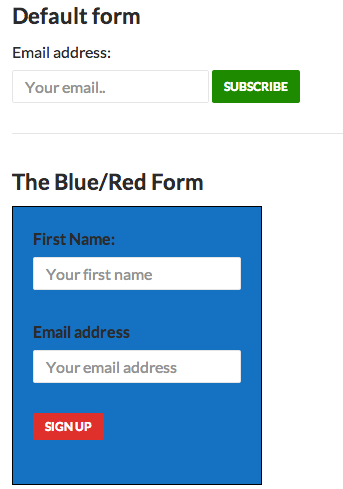
This works without having to write a single line of CSS.
If you’re using the free version of the plugin and need per-form styling, this is a good reason to upgrade to Mailchimp for WordPress Pro.